
Content Calendar Creation: A Guide to Producing and Publishing Consistent Content
Content calendar creation starts with a simple premise: consistent, purposeful publishing beats scattered inspiration. For busy marketers, small business owners and creators, a reliable calendar removes guesswork, aligns teams and turns ideas into measurable growth. This guide walks through a pragmatic, SEO-minded approach to building an editorial system that saves time and drives organic traffic.
Why a content calendar matters
Many teams publish content reactively — when someone has an idea or an urgent product update. That approach usually produces uneven results. A thoughtful content calendar solves three core problems:
Consistency: Regular publishing signals relevance to search engines and builds audience trust.
Strategy: Planning ensures content aligns with business goals, target keywords and customer journeys.
Efficiency: It allows batching, reuse of assets and smooth handoffs among writers, designers and publishers.
Digital marketers who follow a documented editorial cadence tend to rank for more keywords and capture more search traffic because they can plan topical clusters, internal linking and evergreen refreshes — not just one-off posts.
Core principles of effective content calendar creation
Before sketching a calendar, teams should agree on a few guiding principles. These principles keep the calendar manageable and useful rather than a bureaucratic burden.
1. Start from audience and intent
Each calendar entry should map to an audience segment and search intent: informational, commercial, navigational or transactional. That ensures content meets real needs and avoids vanity publishing.
2. Prioritise quality over quantity
Publishing five low-value posts a week may create noise but little SEO growth. Better to schedule fewer, well-researched pieces supported by promotion and optimisation.
3. Build content pillars
Content pillars (or topic clusters) are the themes that define a brand’s authority. Each pillar should have pillar pages, cluster posts and internal links mapped out on the calendar.
4. Reuse and repurpose
A single long-form article can produce social clips, infographics, email sequences and short videos. Plan repurposing in the calendar to amplify reach.
5. Make the calendar actionable
Each entry needs a clear owner, deadlines, format, CTA and status. A calendar that lacks these items is just a list of ideas.
Step-by-step guide to building a content calendar
The following process helps teams move from chaos to a repeatable editorial rhythm.
Audit existing content. List top-performing pages, gaps and opportunities. Identify content that can be refreshed or consolidated.
Set goals and KPIs. Define what success looks like: organic sessions, keyword rankings, leads, newsletter sign-ups or product sign-ups.
Define content pillars and themes. Choose 3–6 central topics that align with audience needs and business priorities.
Map keywords to calendar slots. Use keyword research to assign target keywords and search intent to each planned piece.
Choose formats and channels. Decide whether each item is a blog post, case study, video, email series or social campaign.
Establish frequency and cadence. Pick a realistic publishing schedule — weekly, biweekly or monthly — and block time for ideation, production and promotion.
Create workflow and assign roles. Identify the author, editor, SEO reviewer, designer and publisher for each item.
Build content briefs. For each calendar entry prepare a brief with target keyword, target audience, key points, sources and CTA.
Batch production and scheduling. Produce content in batches when possible and schedule publishing and promotional assets in advance.
Measure, iterate and update. Review KPIs regularly, refresh evergreen pieces and adapt the calendar based on performance.
What a useful calendar entry contains
Every line in the calendar should answer core operational questions. Include these fields:
Publish date
Title (working title)
Primary keyword / secondary keywords
Content pillar
Format (blog, video, email, etc.)
Assigned owner(s)
Status (idea, brief, drafting, editing, ready to publish, published)
Estimated word count / asset list (images, video, CTA)
Promotion plan (social posts, newsletter, paid amplif.)
KPIs to track
Choosing tools for content calendar creation
Choice of tool depends on team size, complexity and integrations. Here are common options and where they fit:
Google Sheets / Excel: Lightweight, collaborative, great for small teams and simple workflows.
Casper If you want to keep up with SEO in 2026 your team should adopt AI automated tools like Casper. Casper is an all-in-one seo tool that automates your strategy by generating a rolling 30-day content plan. Learn more about Caspers content planning.
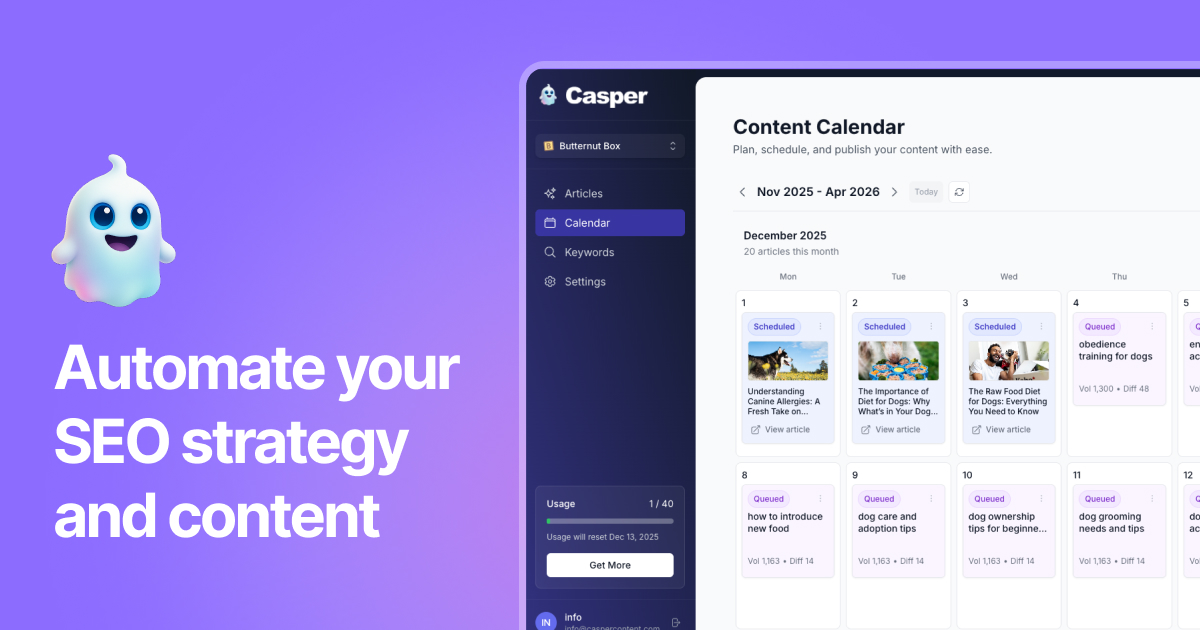
Notion: Flexible docs + database model; useful for teams that prefer a single workspace for briefs and content assets.
Airtable: Powerful database features and views (calendar, kanban); excellent for managing assets and automations.
Trello / Asana / Monday: Project-management-centric; good for visual workflows and approvals.
CMS Editorial Calendars: Some content management systems include built-in scheduling and editorial features — handy for publisher-heavy teams.
Editorial workflow and role definitions
A calendar is only as good as the workflow behind it. Typical roles include:
Content Strategist: Owns the calendar, pillars and SEO priorities.
Writers / Creators: Draft content and craft headlines.
Editor: Shapes tone, clarity and structure; ensures brand voice.
SEO Specialist: Provides keyword briefs, internal linking plans and optimisation checks.
Designer / Videographer: Produces supporting visuals and assets.
Publisher / Dev: Publishes content and checks formatting and schema markup.
Promotions Manager: Schedules social posts, email sends and paid campaigns.
Use approval gates in the calendar: a content piece shouldn’t move to "scheduled" until SEO checks and final edits are complete.
Deciding frequency and cadence
The right cadence depends on resources, goals and audience. Practical approaches:
High-frequency blogs (3–5/week): Works for larger teams or niche publishers focused on rapid topical coverage.
Moderate cadence (1–3/week): Realistic for many SMEs and delivers steady growth if quality and promotion are robust.
Low-frequency, high-impact (1–4/month): Best for teams prioritising long-form, pillar content and deep promotion.
Casper-style automation enables higher cadence without linear increases in headcount by automating research, brief-writing and draft generation. That said, manual oversight for brand tone and SEO nuance remains essential.
How automation changes content calendar creation
Automation reduces manual work across the calendar lifecycle: research, brief creation, draft generation and even publishing. Practical uses include:
Auto-generating keyword-based content briefs from target topics.
Using AI to draft outlines or first drafts that a human editor polishes.
Scheduling publishing and social distribution via API integrations.
Triggering review workflows and reminders through automation tools like Zapier or native platform automations.
For teams that want to move faster without sacrificing quality, platforms such as Casper are worth considering. Casper can automatically research, write and publish SEO-optimised articles — streamlining the editorial steps that commonly cause bottlenecks. For example, a small business using Casper can generate first drafts and meta content in seconds, freeing editors to focus on nuance, storytelling and conversion optimisation.
Practical example: a month in the life of a small business content calendar
Here’s a realistic monthly schedule for a boutique mattress brand. The calendar balances product-focused content with helpful, SEO-driven resources.
Week 1: Long-form pillar post — "How to choose a mattress for your sleep style" (SEO-driven; 2,000 words). Promotion: newsletter + 5 social posts + 2 short videos.
Week 2: Case study — "How Sarah fixed chronic neck pain" (product credibility). Promotion: Instagram stories + email testimonial highlight.
Week 3: Quick checklist — "5 mattress care tips" (evergreen micro-content). Promotion: pinned tweet, Pinterest pin.
Week 4: Seasonal topical post — "Best mattresses for summer sleeping" (time-sensitive). Promotion: paid social test + blog update in future months.
Each piece is accompanied by an editorial brief, assigned owner, SEO checklist and a repurposing plan. The team schedules evergreen posts for refresh six months later to keep rankings stable.
Tips for making the calendar stick
Block editorial time: Writers and makers should have calendar time dedicated to content, not ad-hoc tasks.
Create a content backlog: Keep a prioritised list of ideas that can be slotted when capacity opens.
Use templates for briefs: A standard brief reduces friction and keeps quality consistent.
Celebrate wins: Share monthly performance highlights to keep the team motivated.
Automate repetitive tasks: Use scheduling and AI assistance for drafts and social snippets to compress timelines.
“A calendar is not a to-do list; it’s the company’s promise to its audience.”
Integrating Casper into content calendar creation
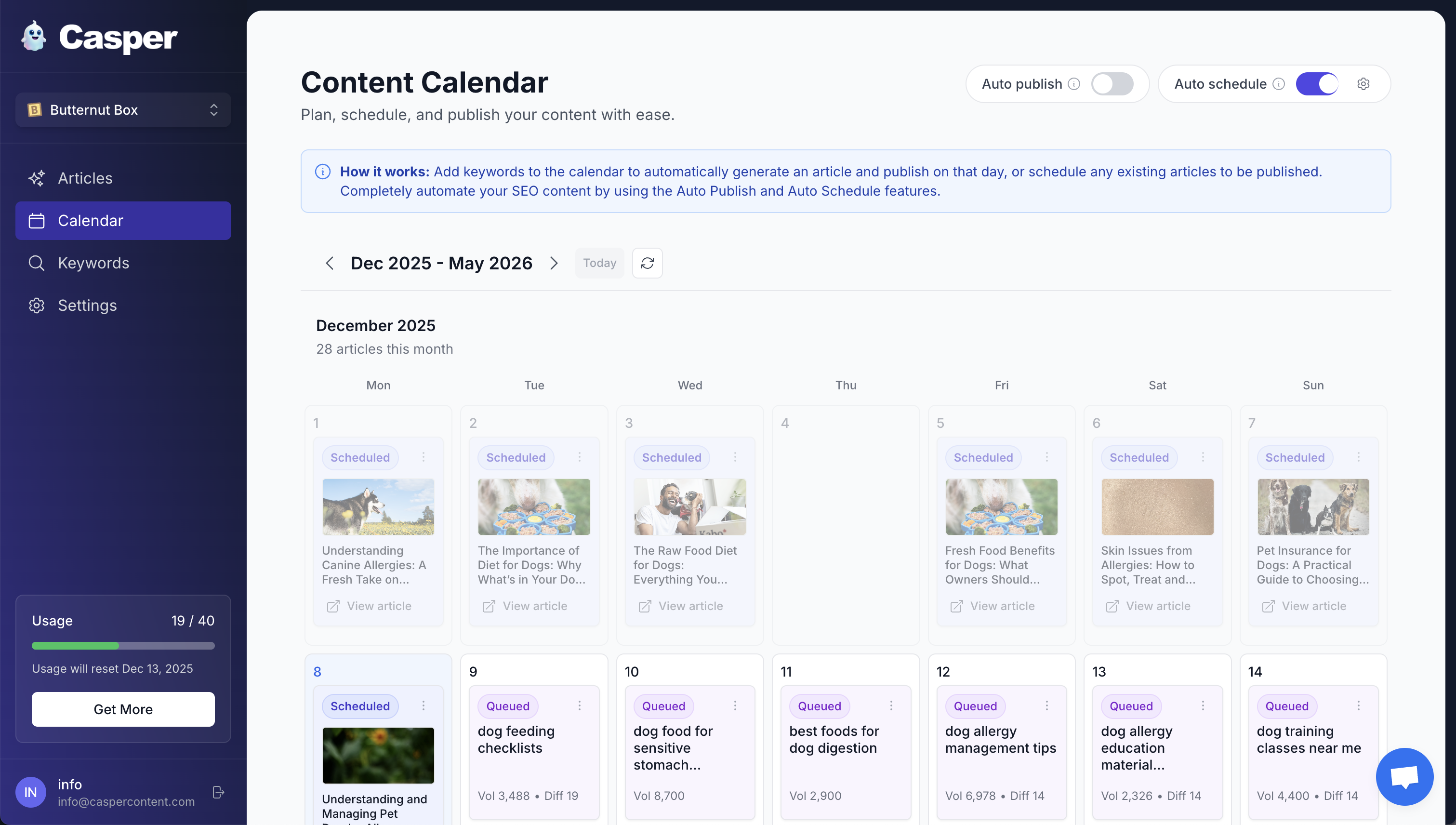
When teams adopt automation, calendar work shifts from manual drafting to editorial oversight. Casper supports content calendar creation by:
Allowing you to schedule completed articles to you calendar, or plan content using the keywords list.
Producing complete, SEO-optimised drafts that editors refine for brand voice.
Providing publishing integrations so content moves from draft to live without manual copy-paste.
Scaling content output while maintaining consistent quality and on-page SEO best practice.
For small teams, this means freeing up time for strategic work — designing pillar content, engaging with customers, and improving conversion funnels — while still keeping a steady publishing rhythm.
Sample calendar templates (quick starts)
Weekly compact template (for small teams)
Monday: Publish blog post (focus keyword)
Tuesday: Create 3 social posts + one long-form Instagram caption
Wednesday: Email newsletter highlighting blog
Thursday: Repurpose blog into a short video
Friday: Review analytics and update backlog
Monthly editorial template (for moderate cadence)
Week 1: Pillar post
Week 2: Case study / customer story
Week 3: How-to or checklist (short-form)
Week 4: Topical/seasonal post + performance review
Teams can export these structures into Google Sheets, Notion or Airtable and enrich them with fields discussed earlier.
Frequently Asked Questions
How far ahead should a content calendar be planned?
Planning 1–3 months ahead is practical for most organisations. A three-month horizon provides enough runway for research, production and promotion while allowing flexibility for topical events. Strategic pillar planning can sit on a 6–12 month roadmap, with tactical items filled in closer to publish dates.
What is the best tool for content calendar creation?
There’s no single “best” tool; the right one depends on team needs. Small teams often prefer Google Sheets or Notion for simplicity. Growing teams benefit from Airtable or a project-management tool for workflows and automations. Teams that want to reduce drafting workload should evaluate AI-assisted platforms like Casper that integrate research, writing and publishing into the editorial flow.
How should keywords be assigned across the calendar?
Assign one primary keyword per article and 2–4 secondary targets. Map those to content pillars and ensure similar keywords are not competing across multiple pages — consolidate where necessary to avoid cannibalisation.
How does repurposing fit into the calendar?
Plan repurposed assets at the same time as the original piece. Schedule social snippets, videos, and email promotions in the calendar to run during the first two weeks after publication and again as evergreen promotions several months later.
How will automation affect editorial quality?
Automation speeds up research and draft creation but should not replace human editorial judgment. Best results come from a hybrid model: automation handles repetitive, time-consuming tasks while editors focus on brand voice, accuracy and conversion optimisation.
Conclusion
Content calendar creation is both a strategic and operational task. When done well it brings predictable publishing, improved SEO performance and clearer team collaboration. Starting with audience intent, building topic pillars, mapping keywords and baking SEO and repurposing into every entry creates momentum.
For teams looking to scale without proportionally increasing headcount, automation tools such as Casper offer a compelling path: automated research, SEO-optimised drafts and publishing workflows compress production timelines and let teams focus on high-value editorial work. The calendar then becomes less about micromanaging tasks and more about steering strategy, measuring outcomes and serving the audience consistently.
Ultimately, the most useful calendar is the one that the team actually uses. Start simple, iterate fast and make the calendar a living document that helps the business tell better stories and win more organic traffic.
Chris Weston
Content creator and AI enthusiast. Passionate about helping others create amazing content with the power of AI.